Agentic Workspaces Decision Framework
Classify each AI action by architecture layer, responsibility, and mechanism so a feature specification can move from intent to verified delivery.
Giving a coding agent more tools does not automatically give it a better development process.
A repository can expose Jira, GitHub, a browser, an IDE, CI, and several specialist agents. The agent still has to decide what to read, which tool to call, when to stop, and what counts as proof. If every instruction and tool schema arrives at startup, the workspace has added capability while making those decisions harder.
This article builds a decision framework for placing each AI action in the right architecture layer, assigning its responsibility, and choosing its mechanism. The end goal is spec-driven development from start to finish. Intent and acceptance criteria enter as a working specification. The agent follows a known delivery process, delegates when needed, and returns evidence against that specification.
Three decisions make that possible:
- Where does it belong? Core, Domain, or Orchestrator.
- What responsibility does it carry? Guide, execute, validate, record, communicate, or escalate.
- Which mechanisms fit the action? Prompt, workspace instructions, skill, hook, agent, script, CLI, MCP server, state store, or human.
This builds on Agent Tool Agnostic Workspaces and Stateful Skills, which cover shared workspace layout and resumable workflows. Here the focus is how those parts compose into one delivery system. The worked example is a UI change because it exercises deterministic, runtime, visual, and human validation. The placement questions can also be applied to backend, data, and platform work with domain-specific proof.
Highlight: The useful measure of an agentic workspace is not how many tools it exposes. It is whether a specification can move from intent to verified delivery without the process being reconstructed in chat.
Use a feature change as the working example
Consider a routine request:
Take ABC-123. Add the empty state described in the ticket to the Orders screen.
Meet its acceptance criteria and open a pull request with test evidence.
The workflow is ordinary. A developer reads the work item, inspects the current feature, makes a plan, changes the code, updates tests, checks the behavior, opens a pull request, responds to review, merges, and updates the work item.
The ticket is a useful starting point, but it is not automatically a complete specification. Before implementation, the workflow may need to resolve missing states, edge cases, design references, rollout constraints, or test expectations. The result should be a small working spec that is durable enough to verify later.
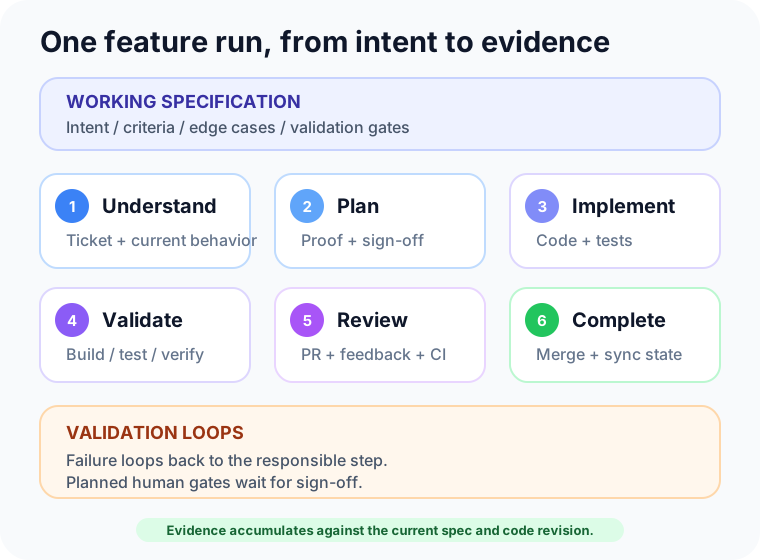
| Stage | Expected output |
|---|---|
| Understand | Intent, current behavior, acceptance criteria, and unresolved questions |
| Plan | Files or components affected, test approach, visual or UAT cases, and stop conditions |
| Implement | Code and test changes constrained by the plan |
| Validate | Deterministic test results plus runtime or visual evidence where needed |
| Review | Pull request, review feedback, and proof for each acceptance criterion |
| Complete | Merged change and synchronized project-management state |
The framework below places each action explicitly instead of asking one chat session to remember and perform everything.
Step 1: Classify every action by architecture layer
Start with three composition layers. They describe whether an action is a reusable primitive, carries domain knowledge, or coordinates a delivery workflow.
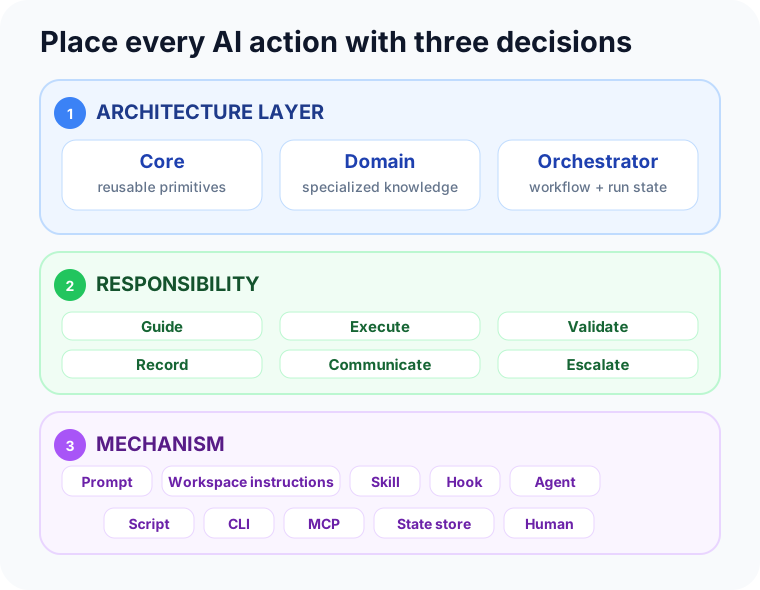
- Core owns domain-neutral building blocks and reusable tasks. Examples include state transitions, evidence logging, retry policy, and generic Git operations.
- Domain owns specialized knowledge and tasks for a technical or product domain. For ABC-123, that includes Orders architecture, UI conventions, and target-specific build and runtime checks.
- Orchestrator owns workflow sequencing, run state, decisions, handoffs, and closure. Here,
ship-changecoordinates the working spec, validation gates, review, and merge state.
Reusability alone does not make an action Core. An Xcode build task may be reusable across many features, but it still carries mobile-platform knowledge and belongs to Domain. Core is reusable and domain-neutral.
The layer is also not the file type. A root AGENTS.md can map the workspace and point to Core and Domain capabilities without containing them all. A skill can implement a Core task, a Domain procedure, or an Orchestrator workflow. State and evidence for ABC-123 are owned by its Orchestrator run.
This separation keeps the Orchestrator small. It composes established Core tasks with only the Domain knowledge needed for the current change.
Step 2: Separate responsibility from mechanism
Architecture answers where an action belongs. Responsibility explains why it exists. Mechanism determines how the workspace expresses or performs it.
- Guide asks which constraints and procedures apply. A prompt,
AGENTS.md, rule, or skill can provide them. - Execute performs the code change or external action through an agent, hook, script, CLI, or MCP server.
- Validate decides whether the result is correct through tests, scripts, a verifier agent, runtime inspection, or a human.
- Record makes progress and evidence durable in a state store, log, report, or evidence index.
- Communicate notifies people and carries replies through a CLI, MCP server, webhook, or project-management tool.
- Escalate routes a decision to a human checkpoint through a communication mechanism.
These responsibilities are not exclusive labels. Opening a pull request executes a remote action, records review state, and communicates with reviewers. The separation is useful because each responsibility needs a clear owner and output.
Prompt and workspace instructions are different mechanisms. A prompt supplies run-specific intent, such as the request to deliver ABC-123. AGENTS.md and rules supply durable repository constraints and routing guidance. Stable policy should not be recopied into every prompt, and one run’s decisions should not be promoted into global instructions.
Mechanisms are not exclusive either. One action may use a skill for procedure, an agent for judgment, a CLI for execution, and a state store for durable output. Choose only the mechanisms that contribute to the action.
A skill can provide the ship-change playbook. The main agent or workflow runtime orchestrates it. A sub-agent performs bounded work or an independent verification. Scripts and test runners produce deterministic proof. Jira, GitHub, browser, or device interfaces connect the run to external systems.
A hook should only own a deterministic event response. It can reject a secret before commit or record that an unfinished run stopped. It should not decide whether ABC-123 satisfies product intent.
Communication is not the source of workflow truth. A Slack or Teams message should be derived from recorded state and include the ticket or run-id. If a reply changes the plan, the Orchestrator records that decision in state before continuing.
Checkpoint: For each action, name its layer, responsibility, and mechanism. “Domain validation through a test script, coordinated by the Orchestrator” is actionable. “Agent tooling” is too broad to guide placement.
Step 3: Keep the Orchestrator’s context small
The main agent should hold only what it needs for its next decision:
- the thin workspace contract
- references for the selected Core tasks
- Domain knowledge for the files and systems in scope
- the current Orchestrator step
- the working spec and current state
- summaries or paths for the latest evidence
It should not hold every company policy, every skill, every MCP schema, and every specialist’s scratchpad.
Skills support this with progressive disclosure. Keep SKILL.md focused on routing and load detailed references only when a step needs them. Sub-agents isolate bounded investigations. Scripts reduce a policy to an exit code and a concise report. Logs let the Orchestrator recover facts without replaying the conversation.
MCP can add another context cost. Depending on the client and configuration, registered tool schemas may be exposed before they are used. Prefer narrow servers, tool filtering, or on-demand discovery where available. Do not expose a large remote surface merely to run a command that already exists locally.
Step 4: Run the feature specification through delivery
The ship-change workflow is the Orchestrator for this example. A skill can encode its playbook, while the main agent or workflow runtime executes it through the existing software delivery lifecycle. It composes Core tasks such as state recording with Domain tasks such as building and verifying the Orders screen.
Build the working spec
Read ABC-123 from its source. With Jira Cloud, the official Atlassian Rovo MCP server can expose work-item fields and transitions as structured tools. With GitHub Issues, the team might use the familiar gh CLI instead.
Note: Jira and GitHub Issues or Projects are examples of project-management systems, not workflow requirements. Use the system your team already treats as the source of intent, acceptance criteria, ownership, and delivery state.
Inspect the current Orders screen, its states, nearby tests, and recent related changes. Compare those facts with the ticket. Write down open questions rather than silently choosing an interpretation.
The implementation starts only when the working spec contains enough information to plan and verify. For this example, ABC-123 becomes:
ABC-123 / working spec revision 1

Intent:
Help a customer with no orders understand the empty state and continue shopping.

AC-1:
After a successful empty response, show the approved title, guidance, and action.
Do not show the empty state during loading or error states.

AC-2:
The action opens the product catalog.

AC-3:
Existing order-list behavior remains unchanged when orders are present.

AC-4:
The empty state has the required accessible semantics and matches the design reference.

Human validation:
Required for AC-4 before review is requested.
Plan and implement
The plan names the affected components, expected proof for each criterion, and required validation gates. It also records whether human sign-off is required. A plan-review sub-agent is useful when the change crosses unfamiliar boundaries or carries meaningful risk. A routine screen edit may not need one.
The implementation agent then follows the plan. Domain guidance enters only for the files and systems being changed. If inspection contradicts the plan, the Orchestrator updates the plan or returns to the unresolved decision. It does not continue only because a checklist says “implement.”
Run build, test, and verification loops
Build, test, and verification are loops rather than one-time checklist items. Each loop records its input, observation, next decision, and evidence.
- Build: Pass when the canonical build completes for the planned scope. On failure, capture diagnostics, fix the smallest responsible change, and build again.
- Test: Pass when focused tests and the required suite succeed. On failure, decide whether the code, test, fixture, or spec is wrong, then rerun.
- Verify: Pass when runtime behavior satisfies each mapped criterion. On failure, return to implementation or an unresolved product decision.
Use repository scripts and the same test runners used by developers and CI. Update existing tests and add cases for new behavior. A verify-change.sh script can compose lint, type checking, unit tests, and repository-specific gates into one stable command.
Deterministic tests do not prove every user-facing change. A screen update may need the app or site to run, the relevant state to be reached, and the result to be inspected. Browser or device MCP tools can help an agent navigate the flow, inspect semantic state, and capture a screenshot. Agent-Ready Xcode Development Loop is one platform-specific example of this broader verification responsibility.
The plan for ABC-123 requires human validation for AC-4. After automated and agent-driven checks pass, the workflow enters awaiting_human_validation. The notification includes the criterion, design reference, screenshot, test summary, and run-id. Approval records who decided, when, and against which spec revision. Rejection returns the run to implementation with the feedback attached.
Every loop needs a stop condition. Repeated failures, contradictory evidence, or an exceeded retry budget should produce a blocked state and handoff instead of an unbounded repair cycle.
The output is not a pasted terminal transcript. Record the command or tool, result, relevant summary, attempt number, and path to full evidence when one exists.
Open the pull request and continue through review
Use git and gh when those are the team’s established interfaces. Create the commit, push the branch, and open a pull request that links the ticket and includes proof. Then update the project-management state and notify reviewers through the team’s normal channel. That channel might be Slack, Teams, email, or another system exposed through a CLI, MCP server, or webhook.
Review is part of the same run. The Orchestrator reads comments, separates required changes from questions, updates code and evidence, and requests another review. It merges only when repository policy, CI, approvals, and the working spec agree that the change is ready. The final transition updates ABC-123 with the pull request and completion state.
Step 5: Choose local script, CLI, or MCP by job
These surfaces overlap. Authentication alone does not distinguish them. Both CLI and MCP tools can reuse a logged-in user and active project outside the model’s conversation.
- Prefer a local script when the repository owns the policy or composition. For example,
verify-change.shcan run the team’s required checks. - Prefer a CLI when developers and CI already share a mature command surface, such as
git,gh, a package manager, or a test runner. - Prefer MCP when the agent benefits from typed operations, structured results, or host-rich interaction, such as Jira transitions, browser inspection, or device automation.
A local script is versioned with the repository. It turns team policy into a repeatable command and can call several CLIs. It usually does not need its own durable session.
A CLI is a product interface optimized for terminal use. A mature CLI has stable commands, exit codes, scripting support, and a workflow engineers already understand. The GitHub CLI can reuse host-side authentication and defaults for issues and pull requests without adding a second tool schema to the agent’s context.
An MCP server presents tools and resources in a form designed for model discovery and structured invocation. That is useful when direct shell plumbing would be brittle, when the system has rich live state, or when the vendor provides an agent-focused surface.
Firebase shows why both can be correct
Firebase ships its CLI and MCP server from the same firebase-tools package. The Firebase MCP documentation states that MCP calls use the same user credentials that authorize the CLI in that environment. They can also share the active project and project directory.
The interfaces still serve different jobs:
| Firebase CLI fits | Firebase MCP fits |
|---|---|
| Emulator processes and test pipelines | Structured Firestore and Realtime Database operations |
firebase.json-driven deployment and serving |
Auth users, Crashlytics issues, Remote Config, and logs |
| Commands developers and CI already run | Project or app operations with explicit tool schemas |
| Shell composition and long-running local work | Firebase documentation and agent-oriented resources |
Firebase’s own examples use both. A workflow may initialize a service through an MCP tool and deploy it through the CLI. Firebase describes skills as the conductor that directs agents to the appropriate CLI or MCP operation.
This is the important distinction. The choice follows the operation, not the product name. Wrapping a stable test command in MCP adds schema without adding useful capability. Forcing a complex remote API through ad hoc shell requests can remove structure the agent needs.
The shared authentication or project configuration is host-side context. It resembles a reusable client in an application, but it is not model memory. Keep credentials in the supported interface. Keep the workflow’s decisions and progress in explicit state.
Step 6: Make interruption and human handoff normal states
Feature delivery rarely fits one uninterrupted session. Review may take hours. CI can fail after a push. Product intent may need clarification.
A stateful skill gives the run an authoritative state separate from chat. Start locally:
.agent-state/ship-change/<run-id>/
  state.json
  CONTEXT.md
  evidence/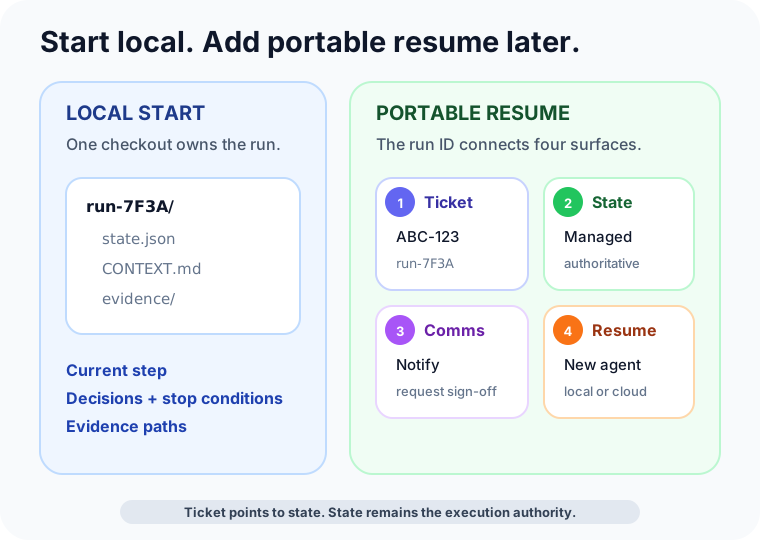
The state records the current step, completed transitions, stop conditions, evidence paths, and pending decision. CONTEXT.md can hold a bounded explanation for later judgment, but it does not replace the routing facts in JSON.
Human delegation becomes an explicit transition. Instead of guessing, the workflow records:
- why it stopped
- what it already checked
- the evidence available
- the exact decision or action needed
- the condition that allows work to resume
The state machine should distinguish a planned validation from an unexpected blocker:
awaiting_human_validation -> validation_approved -> continue
awaiting_human_validation -> validation_rejected -> implement
blocked_human_decision    -> decision_recorded    -> resume
The first path exists because the plan required sign-off. The second handles a question discovered during execution. Both preserve the spec revision and evidence a person reviewed.
The communication interface publishes that handoff to the right people. A useful notification is small: ticket, run-id, current state, blocker, decision needed, and a link to evidence. It should not paste credentials, the full model transcript, or an unbounded tool log into a team channel.
Local state is enough to establish this working model. Later, teams can move authoritative state to a managed service so another machine, cloud agent, or fresh checkout can resume the same run.
Note: A project-management ticket can be the rendezvous point. Store a
run-idon ABC-123 and keep authoritative workflow state on the server under that identifier. A new session reads the ticket, retrieves the state, validates the checkout, and resumes. The ticket points to the state. It does not need to contain a second copy of it.
Step 7: Close against evidence, not activity
Every meaningful transition should leave a small chronological record:
time | step | tool | outcome | evidence pathThe final verifier reads the working spec, state, and evidence. It checks each acceptance criterion and reports missing proof. It does not approve the change merely because tests ran or a pull request exists.
For ABC-123, the final comparison is concrete:
- AC-1 — Pass: Orders empty-state presentation; empty, loading, and error state tests; empty-state screenshot.
- AC-2 — Pass: Catalog navigation action; navigation interaction test; exercised catalog flow.
- AC-3 — Pass: Existing order-list path; orders-present regression suite; exercised existing-list flow.
- AC-4 — Approved: Semantics and visual treatment; accessibility assertion and UI snapshot; recorded human design review.
The verifier also confirms that the evidence belongs to the current spec revision and code revision. Review comments and CI must be resolved, the pull request must be merged, and the project-management state must reflect the outcome.
That is the difference between an agent completing actions and a workspace completing a specification.
Use the chooser when adding an action
Where does it belong?              -> Core, Domain, or Orchestrator
What responsibility does it own?  -> Guide, execute, validate, record, communicate, or escalate

Run-specific intent or request?    -> Prompt
Stable map or constraint?          -> AGENTS.md or a scoped rule
Event-triggered and deterministic? -> Hook
Repeatable procedure?              -> Skill with on-demand references
Long or interruptible procedure?   -> Stateful skill
Bounded work or independent check? -> Sub-agent
Repository-owned proof?            -> Local script
Established terminal interface?    -> CLI
Structured or host-rich system?    -> MCP
Needs team notification or reply?  -> Comms via CLI, MCP, or webhook
Needs product judgment?            -> Human handoff state
Needs durable progress or proof?   -> State store plus chronological evidence
Start with one Orchestrator workflow and local state. Give it a small set of Core tasks and load Domain knowledge only when needed. Add specialist agents or MCP surfaces only when a step has earned them. Once a normal ticket can move from a working spec to verified merge without relying on one conversation, the workspace has the foundation for spec-driven development.