Agent Tool Agnostic Workspaces
A practical repository architecture for sharing agent instructions, skills, and workflows across coding agents without duplicating their source.
Several coding agents. Several copies of the same advice. One of them is wrong, and nobody notices until review.
That is what happens when each client keeps its own instructions, skills, and agents. The repository looks agent-ready. Behavior still depends on which tool opens it.
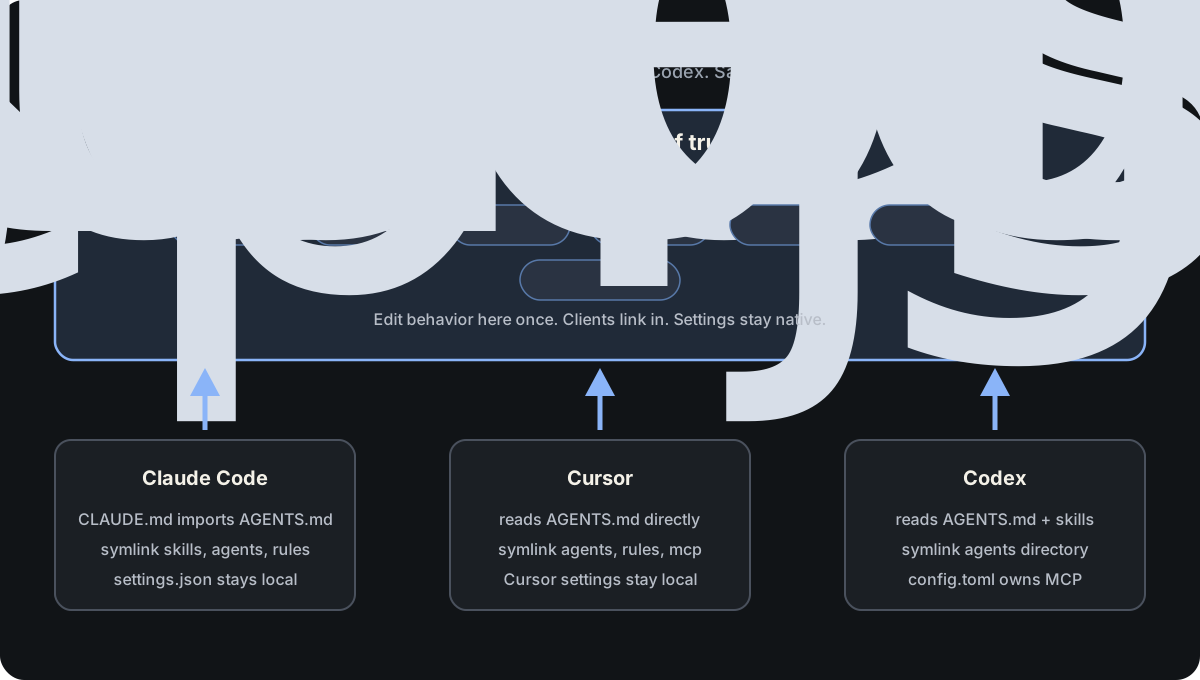
The goal is one place to edit agent behavior, with thin adapters so every client can find that place. It can sit at the repository root, or in a nested package, app, or service directory when a team wants modular spaces for AI artifacts.
This article uses Claude Code, Cursor, and Codex as the working examples. The same pattern applies to other clients a team already uses or wants to try, such as OpenCode. Keep shared behavior under .agents/ and AGENTS.md, then add only the discovery links and native settings that client needs.
This is not format independence. Settings stay native. A symlink routes discovery. It does not convert one client format into another.
Highlight: The open-source
agent-workspaceplugin shipsagent-workspace-initandagent-workspace-auditso teams can bootstrap and maintain this layout across clients. Install it from the ai-agent-engineering marketplace. This article teaches the pattern. The plugin is the tooling you keep using afterward.
| Artifact | Canonical home | How clients find it |
|---|---|---|
| Instructions | AGENTS.md |
Thin workspace map. Claude imports it from CLAUDE.md. |
| Skills | .agents/skills/ |
Cursor and Codex read it. Claude links to it. |
| Agents | .agents/agents/ |
Client agents/ directories link here. |
| Rules | .agents/rules/ |
Include an .agents/** contributing rule. Nested AGENTS.md for features when that is enough. |
| Manifest | .agents/workspace.json |
Records selected clients and MCP sharing for init and audit. |
| MCP | Repo-root .agents/mcp.json |
Repo-root .mcp.json and .cursor/mcp.json link here. Codex uses repo-root .codex/config.toml. |
| Settings | client folders | Never symlinked. |
Highlight: Edit under
.agents/and keepAGENTS.mdas the thin map of that structure. Client folders should hold discovery links and native settings only.
Note: Skills, agents, rules, and their adapters may live at any workspace depth. MCP discovery does not. Keep
.mcp.json,.cursor/mcp.json, and.codex/config.tomlat the git repository root. Nested skill, agent, and rule adapters are best-effort, so verify discovery in each tool you care about.
Build it in this order
The steps below follow the three example clients. When adding another tool, classify each artifact the same way: share the format when you can, keep a thin adapter when you cannot, and leave client-only settings in that client’s folder.
Prove one layer before adding the next. Use one worked example throughout: a prepare-release skill and a verifier agent.
Step 1: Own the operating contract in AGENTS.md
Keep AGENTS.md thin at each workspace root you create, whether that is the repository root or a nested modular space. Its job is to tell every session the shape of that space: where shared behavior lives, what belongs under .agents/, which client folders are only adapters, and which build, test, and safety rules always apply. Put detailed feature guidance in a nested AGENTS.md near the feature when you do not need a full second .agents/ tree.
Cursor and Codex load AGENTS.md directly. Claude Code reads CLAUDE.md, which can import the shared file:
@AGENTS.mdAGENTS.md
CLAUDE.md # imports @AGENTS.mdCheckpoint: Open a fresh session in each client and confirm they report the same build and test contract.
Step 2: Put skills in .agents/skills/
Agent Skills are the clearest portable unit for repeatable work. A skill is a directory with SKILL.md and optional scripts/, references/, and assets/.
Cursor and Codex already discover .agents/skills/. Claude Code discovers .claude/skills/ and documents symlinked skill directories:
mkdir -p .claude .agents/skills
ln -s ../.agents/skills .claude/skills.agents/skills/prepare-release/
SKILL.md
scripts/verify-release.sh
references/release-policy.md
.claude/skills -> ../.agents/skillsPrefer skills over client-specific slash commands. Codex has deprecated custom prompts in favor of skills. Keep the skill dependent on repository scripts rather than client-only tools. If a workflow requires one client, say so in its compatibility metadata.
Note: Skill directory symlinks are documented. Treat agent, rule, and MCP symlinks as a repository convention and verify them in each client.
Step 3: Keep agent formats beside the same role
Claude Code and Cursor discover Markdown agents. Codex discovers TOML agents with fields such as name, description, and developer_instructions. One file cannot be both.
Keep both representations under .agents/agents/ and point every client directory at that folder:
.agents/agents/
verifier.md
verifier.toml
.claude/agents -> ../.agents/agents
.cursor/agents -> ../.agents/agents
.codex/agents -> ../.agents/agents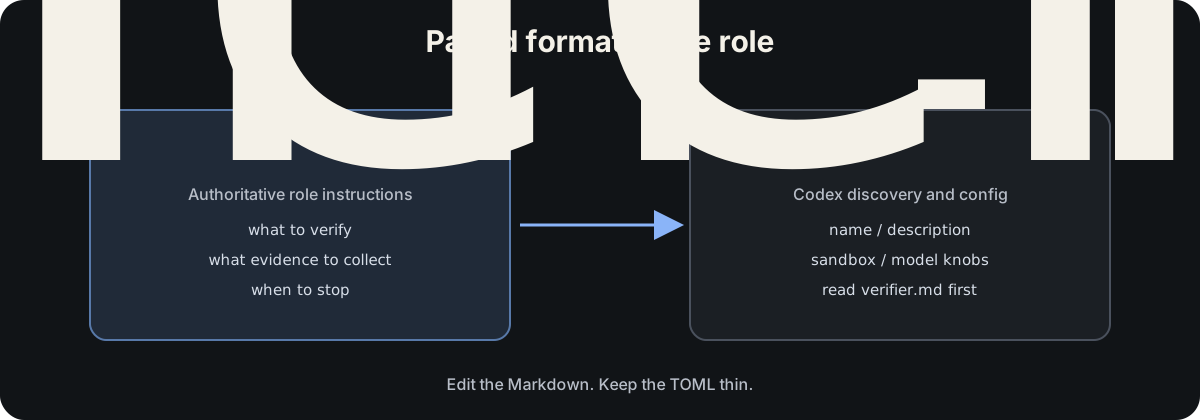
name = "verifier"
description = "Verify completed work and report missing evidence."
developer_instructions = """
Before starting, read `.agents/agents/verifier.md`.
Treat that file as the authoritative instructions for this role.
"""Edit verifier.md. Let the TOML own Codex discovery and optional knobs such as sandbox mode or model. Do not copy the role into TOML.
Step 4: Pair rules the same way, or use nested AGENTS.md
When path-scoped rules are needed, use the same pairing idea. Start with one repository rule that protects the shared tree itself:
.agents/rules/
agents-contributing.md
agents-contributing.mdc
swift.md
swift.mdc
.claude/rules -> ../.agents/rules
.cursor/rules -> ../.agents/rulesagents-contributing.md should load whenever files under .agents/ are added or modified. It points the agent at the contributing instructions for skills, agents, rules, tools, docs, and MCP adapters: where the file belongs, which paired formats are required, and what must not be duplicated into a client folder. The .mdc adapter scopes that rule to .agents/** for Cursor.
Claude Code discovers the Markdown rule. Cursor discovers the .mdc file, whose frontmatter controls activation and whose body references the canonical Markdown.
For many repositories, nested AGENTS.md files are enough for feature-specific guidance and avoid a second rule format. Prefer that when the guidance is directory-scoped rather than file-glob-scoped. Codex should receive behavioral guidance through AGENTS.md, not through its command-execution policy files.
Step 5: Share MCP JSON at the repository root, keep Codex transport native
MCP discovery stays at the git repository root, even when skills and agents live in a nested workspace.
Claude Code reads .mcp.json there. Cursor reads .cursor/mcp.json. Both use a JSON mcpServers object, so they share one canonical file under the root workspace:
.agents/mcp.json
.mcp.json -> .agents/mcp.json
.cursor/mcp.json -> ../.agents/mcp.jsonPoint servers at scripts under .agents/tools/ rather than developer-specific absolute paths.
Codex cannot consume that JSON. Keep the transport adapter in repository-root .codex/config.toml and call the same script:
[mcp_servers.project]
command = ".agents/tools/start-project-mcp.sh"Claude Code keeps .claude/settings.json. Codex keeps the rest of its project settings in .codex/config.toml. Cursor settings stay on Cursor’s supported surfaces. None of those settings files are symlinked.
The finished layout at the repository root looks like this. Nested packages may repeat AGENTS.md, .agents/, and skill adapters without duplicating the MCP discovery files:
AGENTS.md
CLAUDE.md      # imports @AGENTS.md
.mcp.json -> .agents/mcp.json
.agents/
agents/
verifier.md
verifier.toml
skills/
prepare-release/
rules/
agents-contributing.md
agents-contributing.mdc
swift.md
swift.mdc
tools/
docs/
logs/ # gitignored
mcp.json
.claude/
agents -> ../.agents/agents
skills -> ../.agents/skills
rules -> ../.agents/rules
settings.json
.cursor/
agents -> ../.agents/agents
rules -> ../.agents/rules
mcp.json -> ../.agents/mcp.json
.codex/
agents -> ../.agents/agents
config.tomlNote: Codex MCP stays in repository-root
config.toml. The shared fact is the script path, not the configuration language.
Step 6: Verify the routing
A small bootstrap check catches broken discovery before it becomes stale guidance:
test "$(tr -d '\r\n' < CLAUDE.md)" = "@AGENTS.md"
test "$(readlink .claude/skills)" = "../.agents/skills"
test "$(readlink .codex/agents)" = "../.agents/agents"
test "$(readlink .cursor/mcp.json)" = "../.agents/mcp.json"
test "$(readlink .mcp.json)" = ".agents/mcp.json"
test -f .agents/skills/prepare-release/SKILL.md
Extend it to assert that every Codex TOML agent names an existing Markdown role. Run the check in CI and in the repository’s normal bootstrap command.
Also reject links that escape the workspace. Relative links that stay inside the repository are the whole point of this design.
Checkpoint: The same task should receive the same repository policy and workflow in every supported client. Client-specific security and execution controls can still differ.
Start small
Do not migrate every agent file on day one.
- Create a thin
AGENTS.mdand aCLAUDE.mdimport at the workspace root you care about. Verify Step 1. - Move one workflow into
.agents/skills/. Verify Step 2. - Add the
.agents/contributing rule, then either a nested guidance-onlyAGENTS.mdor a full modular workspace under a package path. - Then migrate agents, rules, and MCP with the classification below.
- Install and use
agent-workspace(agent-workspace-init/agent-workspace-audit) so the layout stays authored and verified over time instead of copied from chat.
| Kind | Action |
|---|---|
| Shared format | Link directly |
| Shared meaning, different format | Keep canonical source and thin adapter together under .agents/ |
| Client behavior | Leave it in the client directory |
| Runtime data | Keep it local, bounded, and gitignored |
.agents/logs/ belongs in .gitignore. Logs can contain paths, command output, and secrets. They are for local lookback, not default model context.
Modular workspaces
A workspace root is any directory that owns AGENTS.md plus .agents/, and for selected clients thin adapters for skills, agents, and rules. Monorepos can keep a repository-level workspace and add package-level workspaces where a team needs local skills and agents.
Two nested shapes are useful:
- Guidance-only: a nested
AGENTS.mdwithout.agents/for feature-specific policy that still points at the parent layout. - Full modular workspace: its own
.agents/tree,workspace.json, and skill, agent, and rule adapters. Use this when the package should own skills and agents the same way the root does.
MCP stays singular at the repository root. .mcp.json, .cursor/mcp.json, and .codex/config.toml are not copied into packages. Nested workspaces that need servers still register them through those root discovery files, and through the root .agents/mcp.json when JSON sharing is on.
Checkpoint: After init at a nested path, open each selected client from that package context and confirm it loads the package
AGENTS.mdand skills you expect. Confirm MCP still loads from the repository-root discovery files.
Turn the convention into a plugin
Once the shape is clear, stop rediscovering it from chat. The open-source plugin agent-workspace ships the durable loop:
| Capability | Role |
|---|---|
Skill agent-workspace-init |
Discover current state, ask which clients to configure, then bootstrap, adopt, migrate, extend clients, or add one artifact under .agents/. |
Skill agent-workspace-audit |
Verify symlinks, imports, TOML and Markdown role pairs, MCP sharing, and contributing docs. Optional safe symlink repairs. |
| Agents with the same names | Bounded roles that only run those skills. |
Init writes .agents/workspace.json so audits know which clients were selected. The worked example in this article (prepare-release / verifier) remains the in-repo illustration of a skill and agent pair. The plugin is how teams author and maintain the workspace itself.
Checkpoint: After
agent-workspace-init, runagent-workspace-auditon the same path and keep that check next to CI bootstrap.
Keep the repository ahead of the tools
Clients will keep inventing directories. A repository organized around one vendor eventually turns engineering knowledge into migration work.
AGENTS.md and Agent Skills are useful shared contracts today. Symlinks bridge compatible discovery paths. Thin adapters cover the places where formats still differ. Claude Code, Cursor, and Codex are enough to prove the shape. The same source of truth should absorb the next client without rewriting the team’s rules.
Prefer the plugin’s init and audit skills over copying scripts from this article by hand. Extend the client catalog when a new tool earns a documented adapter. Do not fork a second copy of the team’s rules into that tool’s folder.
The workspace is not tool-independent. It is tool-agnostic in a practical sense: developers can choose the client that fits the task without choosing a different version of the repository’s rules.